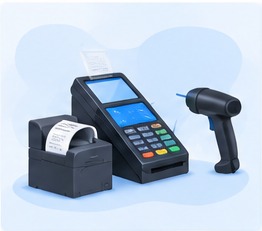
Opening a shop or modernising your checkout quickly raises the question of hardware: do you need a computer? A receipt printer? A barcode scanner? A cash drawer? It is easy to overspend, or on the contrary to buy unsuitable equipment. Here is what hardware to plan for your shop, depending on your business and your budget.
The minimum to take payments
To get started, you need:
- A device to run the software: computer, tablet or even phone. With software that runs in the browser, like GESTIA, a computer is not required.
- An internet connection, even a modest one, to send sales and view your figures. If the checkout works offline, an outage does not block sales.
- A receipt printer, to give each customer proof of purchase.
With these three items, you can already take payments, print receipts and track your stock.
Hardware that saves time
The barcode scanner
It avoids searching for the item by hand and eliminates price errors. Essential as soon as you have many items or a queue at the till: mini-market, supermarket, hardware store, pharmacy.
The cash drawer
It holds the cash and only opens when a payment is taken, which limits errors and temptation. It usually connects to the receipt printer.
The touchscreen or all-in-one till
An all-in-one till combines the screen, the computer and sometimes the printer. It takes up little space and stands up better to heavy use at the counter.
The customer display
A second screen facing the customer shows the items and the total. It reassures the customer and reduces disputes.
Which hardware for which business?
| Business | Recommended hardware |
|---|---|
| Small shop | Tablet or phone, receipt printer |
| Mini-market, supermarket | Screen till, barcode scanner, cash drawer, receipt printer, customer display |
| Hardware store | Sturdy till with printer, barcode scanner |
| Wholesaler | Computer with printer; tablets or phones for the sales staff |
| Restaurant, maquis | Touchscreen at the counter, receipt printer |
| Pharmacy | Screen till, barcode scanner, printer for receipts and invoices |
For detailed recommendations, see our Hardware page.
Think about electricity
Checkout hardware is useless without power. An inverter protects your devices from power cuts and surges and gives you time to finish your sales. A back-up battery can also power a tablet or a phone for several hours. This point is often forgotten, yet it is essential in Benin.
Advice before you buy
- Check that the hardware is compatible with your software. Not all printers and scanners work with all software.
- Start simple. You can add a barcode scanner or a customer display later.
- Think about after-sales service. Equipment bought far away, with no repairer or spare parts available, can put your checkout out of action for a long time.
- Plan your consumables. Rolls of thermal paper, spare cables: a minimum stock avoids nasty surprises.
- Don't oversize. The most expensive hardware is not necessarily the best suited to your counter.
And a checkout without internet?
The choice of software matters as much as the hardware. A checkout that stops as soon as the connection drops forces you back to the notebook. Check that your checkout keeps taking payments and printing without internet. Read Running your business without internet.
With GESTIA
GESTIA runs in the browser of a computer, a tablet or a phone: you can start with the equipment you already have. The checkout reads barcodes, prints receipts and standardised invoices, and keeps taking payments without internet. No hardware yet? GESTIA offers it or helps you get it, on quotation. See also GESTIA for shops and mini-markets.
In summary
- The minimum: a device, a connection, a receipt printer.
- To go faster: barcode scanner, cash drawer, customer display.
- Match the hardware to your business and think about electricity.
- Check compatibility with your software before buying.
The GESTIA checkout licence is free for 3 months. After that, the licence is paid according to the plan you choose.